Advising Month
Student Responsibilities
Academic advising is a shared responsibility. Use the information below to prepare for and successfully complete your advising and registration process.
Get Started
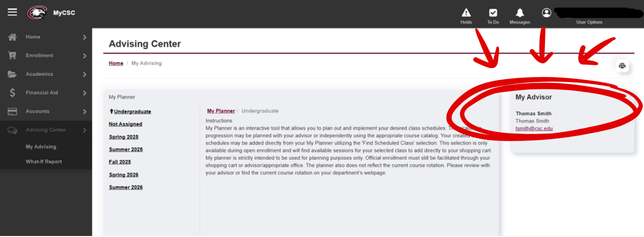
- Log in to your MyCSC account to find the name of your assigned advisor.
- Schedule an appointment with your faculty advisor.
- Introduce yourself and begin building a professional relationship.
Prior to Your Advising Appointment
To make the most of your time:
- Review the online catalog and confirm the specific requirements for your major and/or endorsement.
- Make a tentative list of courses you would like to take in upcoming terms by reviewing available courses in MyCSC.
- Write down any questions about courses, internships, graduation requirements, or your future plans.
During Your Appointment
Be prepared to discuss:
- Your current semester and overall academic progress.
- Your academic and career goals, plus graduation timeline.
- Internship requirements (degree or Career Scholarship).
- Prerequisites and course sequencing.
- Any scheduling constraints that could affect registration.


To register for classes:
You and your faculty advisor may decide from a variety of options for enrolling in courses when the registration period opens. These may include:
- Reserving the courses you want by using the shopping cart feature in MyCSC and clicking enroll.
- Creating a list of desired courses and scheduling an appointment with START to be enrolled.
- Emailing START@csc.edu the list of preferred courses.
- The faculty advisor registers you directly through MyCSC.
Considerations:
- Courses that are in high demand will fill up quicker than others. The sooner you register, the more likely you are to secure a seat in the course.
- Work with your advisor to adjust your schedule or plans if a course is full or unavailable. Faculty may also help complete a waitlist request.
- If you have a double major, endorsements, or a minor, it’s a good idea to visit with an advisor for both degree programs.
Frequently Asked Questions
- Choose question
-
Who is my advisor? How do I find out who my advisor is?
Students are assigned a faculty advisor during their first semester at CSC. The faculty advisor will be a member in the same department as your major. If you are undecided, you will be advised by a Student Services’ advisor or Deena Kennell. Students with more than one major may have more than one advisor.
You can find who your advisor is in MyCSC in the Advising Center tab: